share folder
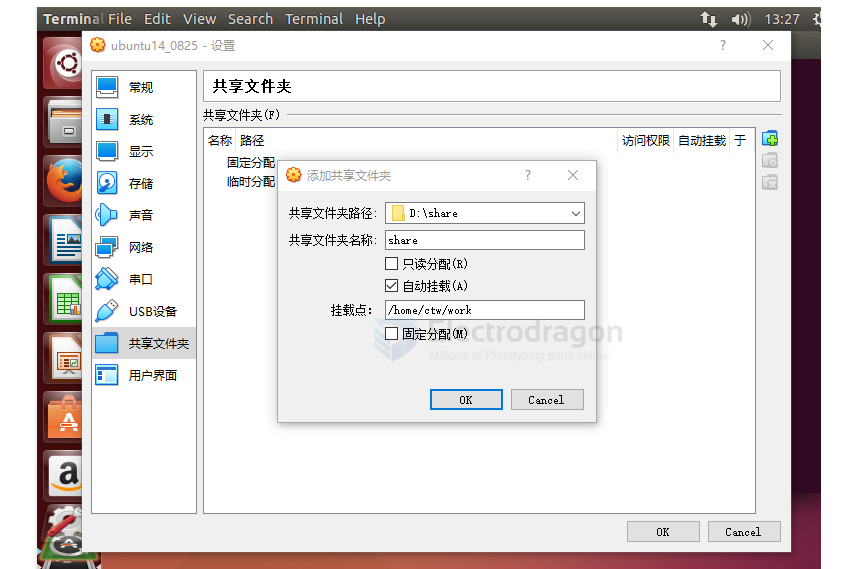
- 打开终端 (Open the terminal).
- 使用命令 cd /mnt 进入到 mnt 目录 (Use the command cd /mnt to enter the mnt directory).
- 使用命令 sudo mkdir share 创建 share 文件夹 (Use the command sudo mkdir share to create the share folder).
- 使用命令 sudo mount -t vboxsf share /mnt/share 挂载共享文件夹 (Use the command sudo mount -t vboxsf share /mnt/share to mount the shared folder).
- 进入到 share 目录 (Enter the share directory).
- 使用 ls 命令查看挂载结果 (Use the ls command to check the mounted folder).
basic
apt-get update apt-get upgrade apt-get install
dependency
sudo apt-get install gcc make cmake rsync wget unzip build-essential git bc swig libncurses-dev libpython3-dev libssl-dev python3-distutils android-tools-mkbootimg -y

sudo apt-get install build-essential subversion git-core libncurses5-dev zlib1g-dev gawk flex quilt libssl-dev xsltproc libxml-parser-perl mercurial bzr ecj cvs unzip lib32z1 lib32ncurses5 lib32bz2-1.0 -y

sudo apt-get install vim flex bison texinfo u-boot-tools lib32stdc++6 libusb-1.0-0-dev mtd-utils -y

sudo apt install libz libusb-1.0-0-dev
disable
打开终端 (Open the terminal). 关闭锁屏 (Disable lock screen):
gsettings set org.gnome.desktop.screensaver lock-enabled false
关闭自动挂起 (Disable automatic suspend):
gsettings set org.gnome.settings-daemon.plugins.power sleep-inactive-ac-type 'nothing'
gsettings set org.gnome.settings-daemon.plugins.power sleep-inactive-battery-type 'nothing'