demo code
how to use a downloaded project
- replace .vscode/settings.json with your own .vscode/settings.json
- optionally replace .vsconde/c_cpp_properties.json with your own .vscode/c_cpp_properties.json
start a project
example - blink
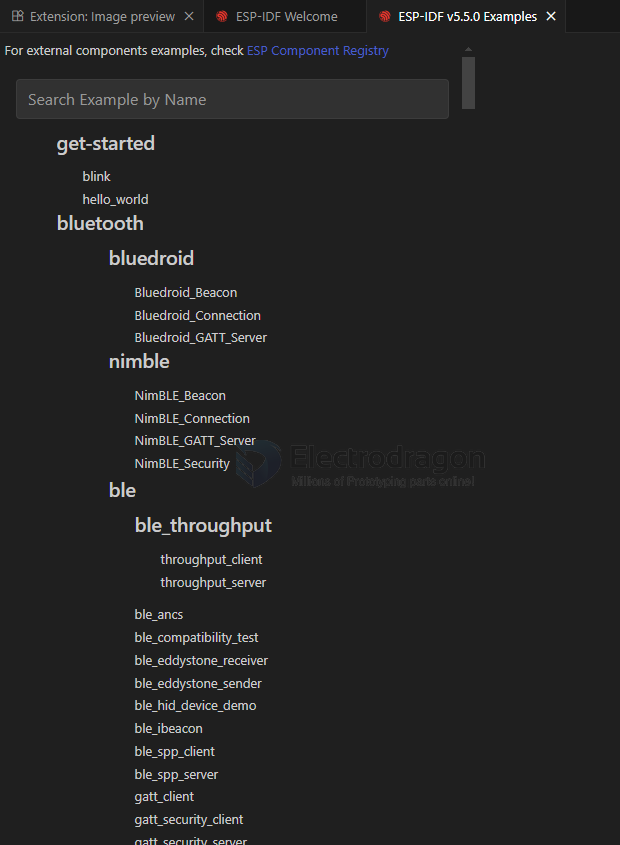
start from example
commands
COMMANDS - build project
- Select Current Project workspace folder
- *Select current ESP-IDF version * == UART / JTAG / DFU
- ESP-IDF: Select Flash Method
- Select Port to Use (COM, tty, usbserial)
- Select Monitor Port to Use (COM, tty, usbserial)
- Select Project Configuration
- Set Espressif Device Target (IDF_TARGET)
- SDK Configuration Editor (menuconfig)
- Full Clean
- Build Project
- Flash Device
- Monitor Device
- Debug
- ESP-IDF: Build, Flash and Monitor
- Open ESP-IDF Terminal
- Execute Custom Task
- Start/Stop QEMU Server [OpenOCD Server]
Advanced
compile
*******************************************************************************
# ESP-IDF Partition Table
# Name, Type, SubType, Offset, Size, Flags
nvs,data,nvs,0x9000,24K,
phy_init,data,phy,0xf000,4K,
factory,app,factory,0x10000,1M,
*******************************************************************************
[75/1063] Building C object esp-idf/esp_driver_i2s/CMakeFiles/__idf_esp_driver_i2s.dir/i2s_tdm.c.obj
compile ninja
-
Executing task: e:\work-data\IDF_tools\tools\ninja\1.12.1\ninja.EXE
[1/4] C:\WINDOWS\system32\cmd.exe /C "cd /D E:\Git...-Arduino/esp-idf-code/blink/blink/build/blink.bin blink.bin binary size 0x270c0 bytes. Smallest app partition is 0x100000 bytes. 0xd8f40 bytes (85%) free. [2/4] Performing build step for 'bootloader' [1/1] C:\WINDOWS\system32\cmd.exe /C "cd /D E:\Git-category\Git-Arduino\esp-idf-code\blink\blink\build\bootloader\esp-idf\esptool_py && e:\work-data\IDF_tools\python_env\idf5.5_py3.11_env\Scripts\python.exe E:/work-data/IDF/v5.5/esp-idf/components/partition_table/check_sizes.py --offset 0x8000 bootloader 0x1000 E:/Git-category/Git-Arduino/esp-idf-code/blink/blink/build/bootloader/bootloader.bin" Bootloader binary size 0x6680 bytes. 0x980 bytes (8%) free. [4/4] Completed 'bootloader'
compile summary
                         Memory Type Usage Summary

┏━━━━━━━━━━━━━━━━━━━━━━━┳━━━━━━━━━━━━━━┳━━━━━━━━━━┳━━━━━━━━━━━━━━━━┳━━━━━━━━━━━━━━━┓
┃ Memory Type/Section   ┃ Used [bytes] ┃ Used [%] ┃ Remain [bytes] ┃ Total [bytes] ┃
┡━━━━━━━━━━━━━━━━━━━━━━━╇━━━━━━━━━━━━━━╇━━━━━━━━━━╇━━━━━━━━━━━━━━━━╇━━━━━━━━━━━━━━━┩
│ Flash Code            │        67126 │          │                │               │
│    .text              │        67126 │          │                │               │
│ IRAM                  │        52151 │    39.79 │          78921 │        131072 │
│    .text              │        51123 │     39.0 │                │               │
│    .vectors           │         1028 │     0.78 │                │               │
│ Flash Data            │        31800 │          │                │               │
│    .rodata            │        31544 │          │                │               │
│    .appdesc           │          256 │          │                │               │
│ DRAM                  │        10864 │     6.01 │         169872 │        180736 │
│    .data              │         8712 │     4.82 │                │               │
│    .bss               │         2152 │     1.19 │                │               │
│ RTC FAST              │           32 │     0.39 │           8160 │          8192 │
│    .force_fast        │           32 │     0.39 │                │               │
│ RTC SLOW              │           24 │     0.29 │           8168 │          8192 │
│    .rtc_slow_reserved │           24 │     0.29 │                │               │
└───────────────────────┴──────────────┴──────────┴────────────────┴───────────────┘
Total image size: 159821 bytes (.bin may be padded larger)
Note: The reported total sizes may be smaller than those in the technical reference manual due to reserved memory and application configuration. The total flash size available for the application is not included by default, as it cannot be reliably determined due to the presence of other data like the bootloader, partition table, and application partition size.
Flash
JTAG == JTAG-dat
DFU == DFU-dat
UART == serial-dat
*  Executing task: e:\work-data\IDF_tools\python_env\idf5.5_py3.11_env\Scripts\python.exe e:\work-data\IDF\v5.5\esp-idf\components\esptool_py\esptool\esptool.py -p COM1 -b 460800 --before default_reset --after hard_reset --chip esp32 write_flash --flash_mode dio --flash_freq 40m --flash_size 2MB 0x1000 bootloader/bootloader.bin 0x10000 blink.bin 0x8000 partition_table partition-table.bin

esptool.py v4.9.0
Serial port COM1
Connecting......................................
monitor devices
PS E:\Git-category\Git-Arduino\esp-idf-code\blink\blink>  & 'e:\work-data\IDF_tools\python_env\idf5.5_py3.11_env\Scripts\python.exe' 'e:\work-data\IDF\v5.5\esp-idf\tools\idf_monitor.py' -p COM1 -b 115200 --toolchain-prefix xtensa-esp32-elf- --make '''e:\work-data\IDF_tools\python_env\idf5.5_py3.11_env\Scripts\python.exe'' ''e:\work-data\IDF\v5.5\esp-idf\tools\idf.py''' --target esp32 'e:\Git-category\Git-Arduino\esp-idf-code\blink\blink\build\blink.elf'
--- Warning: GDB cannot open serial ports accessed as COMx
--- Using \\.\COM1 instead...
--- esp-idf-monitor 1.7.0 on \\.\COM1 115200
--- Quit: Ctrl+] | Menu: Ctrl+T | Help: Ctrl+T followed by Ctrl+H
SDKCONFIG
- sdkconfig
- sdkconfig.defaults
- sdkconfig.defaults.esp32
- sdkconfig.defaults.esp32c3
- sdkconfig.defaults.esp32c5
- sdkconfig.defaults.esp32c6
- sdkconfig.defaults.esp32c61
- sdkconfig.defaults.esp32h2
- sdkconfig.defaults.esp32p4
- sdkconfig.defaults.esp32s2
- sdkconfig.defaults.esp32s3
✅ Required Files (For ESP32-S3 Only)
| File Name | Required | Description |
|---|---|---|
sdkconfig.defaults.esp32s3 |
✅ | Default configuration specific to ESP32-S3 |
sdkconfig |
✅ | Generated after idf.py menuconfig or first build |
✅ Optional Simplification
If you're only working with ESP32-S3, you can rename:
mv sdkconfig.defaults.esp32s3 sdkconfig.defaults
Then build normally:
idf.py build