for F1C100
https://gitee.com/LicheePiNano/Linux.git
完整下载命令为:
git clone https://gitee.com/LicheePiNano/Linux.git

git clone --depth=1 -b master https://gitee.com/LicheePiNano/Linux.git

git clone --depth=1 -b nano-4.14-exp https://github.com/Lichee-Pi/linux.git
config == 使用./arch/arm/configs/f1c100s_nano_linux_defconfig 配置文件
compile
make ARCH=arm f1c100s_nano_linux_defconfig

make ARCH=arm CROSS_COMPILE=arm-linux-gnueabi- -j8

make ARCH=arm CROSS_COMPILE=arm-linux-gnueabi- -j16 INSTALL_MOD_PATH=out modules

make ARCH=arm CROSS_COMPILE=arm-linux-gnueabi- -j16 INSTALL_MOD_PATH=out modules_install
...
AS      arch/arm/boot/compressed/piggy.o
LD      arch/arm/boot/compressed/vmlinux
OBJCOPY arch/arm/boot/zImage
Kernel: arch/arm/boot/zImage is ready
编译成功后,生成文件所在位置:
- 内核img文件: ./arch/arm/boot/zImage
- 设备树dtb文件: ./arch/arm/boot/dts/suniv-f1c100s-licheepi-nano.dtb
- modules文件夹:./out/lib/modules
将zImage与dtb文件放入nano第一分区.
note
修改下载的配置文件名为.config == SDK-dat/OS-dat/linux-dat/config
mv lichee_nano_linux.config ./config

make ARCH=arm
系统默认的账号密码
账号:root
密码:licheepi
setup
wifi
WiFi Setup (English)
1. Enable the Wireless Network Card
ifconfig wlan0 up2. Scan for Nearby WiFi Networks
iw wlan0 scan | grep SSID3. Configure WiFi SSID and Password
Edit and run the following to set your WiFi credentials:
echo "
update_config=1
network={
    ssid="your_ssid"      # WiFi name
    psk="your_password"   # WiFi password
}" > /etc/wpa_supplicant.conf
4. Connect to the Wireless Network
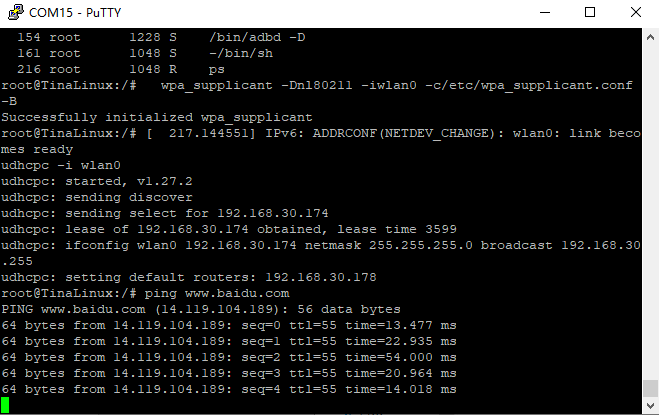
wpa_supplicant -Dnl80211 -iwlan0 -c/etc/wpa_supplicant.conf -B5. Obtain IP Address via DHCP
udhcpc -i wlan06. Test Connection
ping www.baidu.com