Check Channel Map: should be AETR.
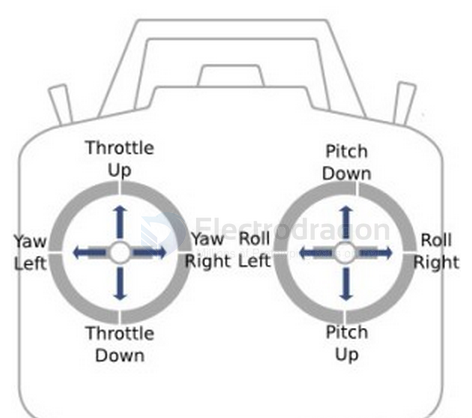
- A: Aileron (Roll)
- E: Elevator (Pitch)
- T: Throttle
- R: Rudder (Yaw)
A Roll E Pitch R Yaw T Throttle
Roll Pitch Yaw Throttle
drift
2. Calibration & Orientation
- Betaflight →
Setup→ Calibrate Accelerometer (drone must be level).
- In
Setup3D model: tilt the drone → model should move the same way.
If not → fix in Configuration →
Board Alignment(Yaw 90/180/270 etc).
- Calibrate Accelerometer: Betaflight → Setup → Calibrate on a perfectly flat surface.
- Make sure the quad is completely still during calibration.
- Check Setup Tab 3D model → it must move exactly like the real quad.
- If model twitches on its own → gyro noise or vibration problem.
4. Fixing “Steady Right Drift”
- If subtrim is correct but it still drifts → go to
PID Tuning.
- Increase Roll I-term slightly (+1 → +4, test each step).
- If oscillations appear → reduce Roll P or Roll D by small steps (-1).
- Check Motor Idle value:
Configuration → DShot Idlearound 5% (or min_command ≈1050).

- Reset to Betaflight default PIDs for Mobula8 (start clean).
- Reduce Roll/Pitch P by 10% if oscillations occur.
- Increase I-term by +5 if drift is slow and continuous.
4. Angle Mode Settings
- If drift only happens in Angle Mode:
- Use small Accelerometer Roll/Pitch Trim adjustments.
- Example: Drift forward → Pitch Trim negative.
- Use small Accelerometer Roll/Pitch Trim adjustments.
If drift happens in Acro Mode too
→ it’s not accelerometer, it’s mechanical or PID.
🛠️ PID Tuning for Slow & Smooth Flight (Mobula8)
1. Start from Defaults
- In Betaflight Configurator → PID Tuning Tab → click Reset to Defaults.
- This gives you a stable baseline.
2. Lower P and D Gains (Gentler Response)
- Roll / Pitch P: reduce by ~20%
- Roll / Pitch D: reduce by ~20%
- Yaw can stay default. 👉 Lower P/D = less aggressive corrections → smoother flying.
3. Increase I-Term Slightly (Stable Hover)
- Roll / Pitch I: increase by +10–15%
👉 Helps hold level in hover, prevents drift.
4. Add a Bit of Damping (TPA / D-Term Filter)
- Leave filters at default first.
- If motors get hot, lower D-Term a bit more.
5. Rates (Most Important for Smooth Flying)
Go to Rates Tab:
- RC Rate: 0.80 → change to 0.50
- Super Rate: 0.70 → change to 0.60
- Expo: set to 0.25–0.30 👉 Slows down stick sensitivity, smoother camera movement.
6. Throttle Curve (for Gentle Hover)
- Betaflight: use Throttle Expo in PID Tuning → Throttle tab.
- Throttle Mid: set to ~0.50
- Throttle Expo: set to 0.20–0.30
👉 Gives finer control near hover point.
- Throttle Mid: set to ~0.50
7. Test Hover Indoors
- Arm in Angle Mode.
- Slowly raise throttle.
- Quad should lift smoothly without sudden jerks.
- Adjust Expo if still too sensitive.
✅ Summary for Smooth / Cinewhoop-style Flying
- Lower P/D = softer movements.
- Raise I = stable hover.
- Reduce Rates + add Expo = slower stick response.
- Throttle Expo = smoother lift / descend.
RC-console-dat
RC Tx
RC Receiver
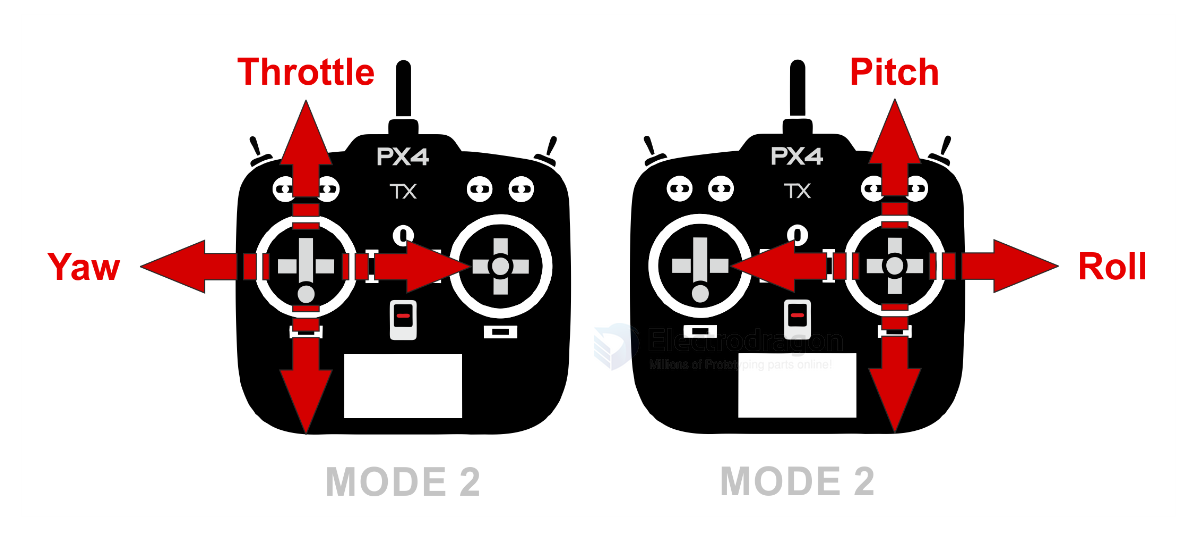
When you push the RC console (joystick or stick) up and down, you're typically controlling the throttle or elevator channel, depending on the mode of your transmitter. The PWM (Pulse Width Modulation) signal output sent to the receiver or flight controller varies accordingly:
PWM signal range: ~1000 µs (microseconds) to ~2000 µs
Center/stick neutral: ~1500 µs

Stick fully down: ~1000 µs

Stick fully up: ~2000 µs
Example:
If you're using Mode 2 (common mode):
Left stick up/down = Throttle
Stick down = 1000 µs (zero throttle)

Stick up = 2000 µs (full throttle)
If it's controlling elevator (pitch):
Stick down (nose down) = 1000 µs

Stick up (nose up) = 2000 µs