Relay Networking
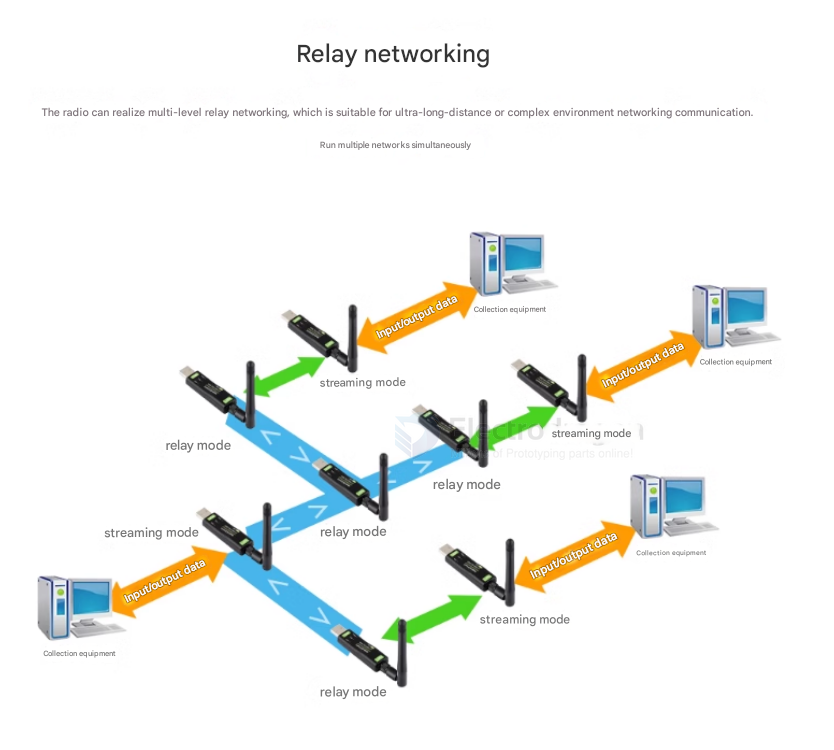
Relay mode refers to a transmission mode in which some LoRa devices in a LoRa network act as relay nodes to forward data streams from stream mode or packet mode. The relay mode device's interface does not output any data, achieving the function of extending the wireless communication distance.
Packet Mode
Packet mode refers to a transmission mode in which the first 3 bytes of the data stream sent by a LoRa device specify the address and channel of the receiving device.
The data stream uses hexadecimal (Hex) data format.
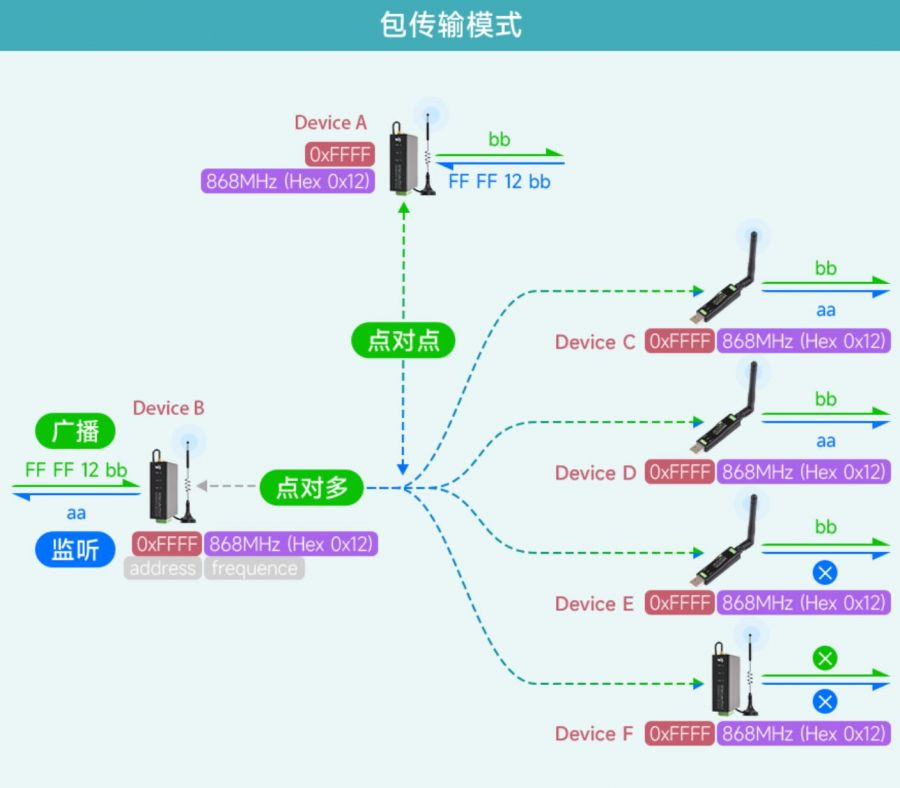
Suppose there are six LoRa devices: Device A, B, C, D, E, and F, forming a packet mode LoRa communication network. To change the address, channel, and working mode of devices in the LoRa network, refer to the communication diagram and parameter table below. Note: Use the AT command (AT+MODE=2\r\n) to switch to packet mode.
-
Device A and Device C form point-to-point communication in packet mode.
- Device A sends the hex data stream
FF FE 12 AA, whereFF FEis the address of the receiving device (Device C),12is the channel of the receiving device (Device C), andAAis the data (hexadecimal format, e.g., AA, AF, FA, etc.). Device C with matching address and channel receives it correctly. - Device C sends the hex data stream
00 01 12 CC, where00 01is the address of the receiving device (Device A),12is the channel of the receiving device (Device A), andCCis the data. Device A with matching address and channel receives it correctly.
- Device A sends the hex data stream
-
Devices A, B, C, D, E, and F form point-to-multipoint communication in packet mode.
- Device B's address is set to 65535 (Hex: 0xFFFF), making it a broadcast listening device in the LoRa network. When Device B broadcasts a data stream, all devices with addresses from 0 to 65535 on the same channel can receive the data stream. When other devices send data streams, Device B can listen to the data streams from devices with addresses from 0 to 65535 on the same channel.
- Device B broadcasts the hex data stream
FF FF 12 BB, whereFF FFis the broadcast address,12is the channel, andBBis the data. Devices A, C, D, and E with matching channel (18Hex:0x12) receive it correctly. Device F with a non-matching channel (65Hex:0x41) fails to receive. - When Devices A, C, D, or E send data streams (e.g., Device A sends
FF FE 12 AA), Device B can listen and receive the data stream. - When Device F (with a non-matching channel,
65Hex:0x41) sends a data stream, Device B fails to listen and receive.
Stream Mode
Stream Mode Overview
Stream mode means that a LoRa Device (SX1262-LoRa-DTU, USB-TO-LoRa) transmits the data stream received from its interface via LoRa to another device, which demodulates and outputs the data stream from its specified interface. What you send is what you get.
Example Network
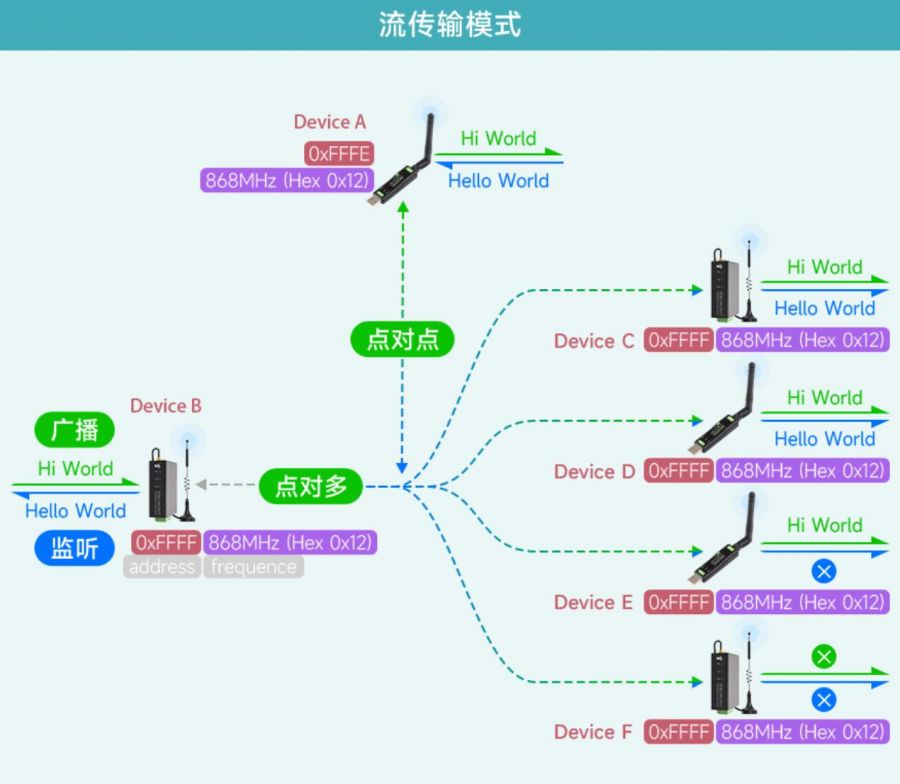
Suppose there are six LoRa devices: Device A, B, C, D, E, and F, forming a stream mode LoRa communication network.
- To change the address, channel, and working mode of each device in the LoRa network, refer to the communication diagram and parameter table below.
- Use the AT command to switch to stream mode:
AT+MODE=1\r\n
1. Point-to-Point Communication
- Device A and Device C form a point-to-point communication in stream mode.
- Device A sends
Hello Worldto Device C. Device C with matching address and channel receives it correctly. - Device C sends
any Worldto Device A. Device A with matching address and channel receives it correctly.
2. Point-to-Multipoint Communication & Broadcast Listening
- Devices A, B, C, D, E, and F form a point-to-multipoint communication network in stream mode.
- Device B's address is set to 65535 (Hex: 0xFFFF), making it a broadcast listening device in the LoRa network.
- When Device B broadcasts a data stream, all devices with addresses from 0 to 65535 on the same channel can receive the data stream.
- When other devices send data streams, Device B can listen to the data streams from devices with addresses from 0 to 65535 on the same channel.
Examples
- Device B broadcasts
Hi Worlddata stream. Devices A, C, D, and E with matching channels receive it correctly. Device F with a non-matching channel fails to receive. - When Devices A, C, D, or E send data streams (e.g., Device A sends
Hello World), Device B can listen and receive the data stream. - When Device F (with a non-matching channel) sends a data stream, Device B fails to listen and receive.
Communication Diagram