JTAG Debugging with ESPLink
ESPLink supports JTAG debugging for ESP series chips, making it easy to diagnose system crashes. The following instructions use ESP32-S2 as an example.
Openocd 安装
$git clone https://github.com/espressif/openocd-esp32.git
$cd openocd-esp32
$./bootstrap
$./configure --enable-cmsis-dap
$make -j
$sudo make install
Attach to ESP32-S3
pi@raspberrypi:~/oss/openocd-esp32 $ sudo ./src/openocd -s /home/pi/oss/openocd-esp32/tcl -f tcl/interface/esp_usb_bridge.cfg -f tcl/target/esp32s2.cfg
Sample output:
Open On-Chip Debugger  v0.11.0-esp32-20220411-5-g03cd2031 (2022-04-25-09:45)
Licensed under GNU GPL v2
For bug reports, read
        http://openocd.org/doc/doxygen/bugs.html
Info : only one transport option; autoselect 'jtag'
Info : esp_usb_jtag: VID set to 0x303a and PID to 0x1002
Info : esp_usb_jtag: capabilities descriptor set to 0x30a
adapter speed: 4000 kHz
Warn : Transport "jtag" was already selected
Info : Listening on port 6666 for tcl connections
Info : Listening on port 4444 for telnet connections
Info : esp_usb_jtag: serial (84F703D20134)
Info : esp_usb_jtag: Device found. Base speed 750KHz, div range 1 to 1
Info : clock speed 750 kHz
Info : JTAG tap: esp32s2.cpu tap/device found: 0x120034e5 (mfg: 0x272 (Tensilica), part: 0x2003, ver: 0x1)
Info : esp32s2: Debug controller was reset.
Info : esp32s2: Core was reset.
Info : starting gdb server for esp32s2 on 3333
Info : Listening on port 3333 for gdb connections
Debug
Once attached successfully, you can open another terminal window to operate using either GDB or Telnet. Examples are provided below:
Debug with Gdb
$xtensa-esp32s2-elf-gdb -ex 'target remote 127.0.0.1:3333' ./build/blink.elf
(gdb) info reg
(gdb) s
(gdb) continue
Debug with telnet $telnet localhost 4444 >reset >halt >reg >step >reg pc >resume
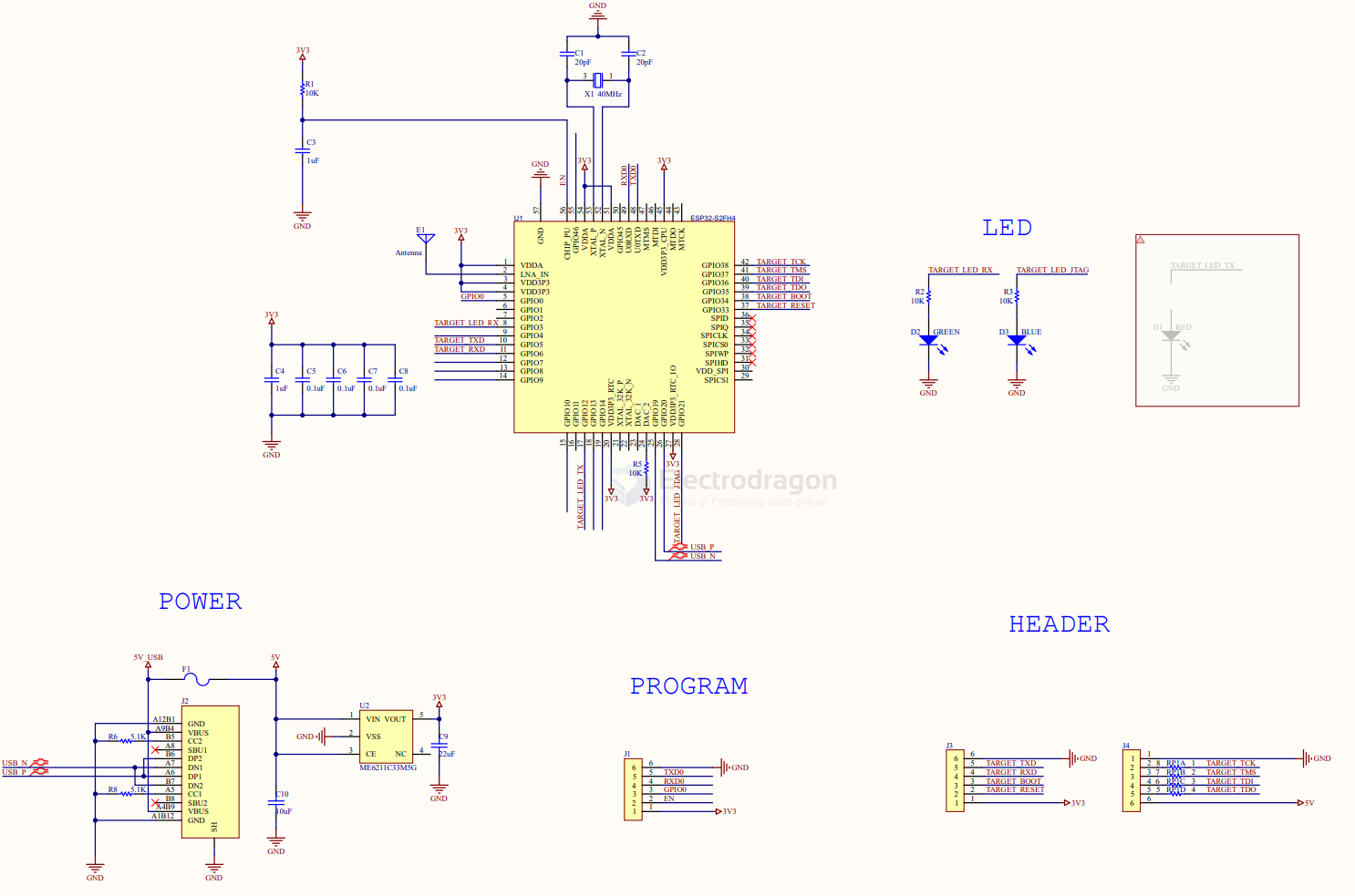
schematic
firmware
how to flash
/home/pi/.espressif/python_env/idf4.4_py3.9_env/bin/python ../esp-idf/components/esptool_py/esptool/esptool.py -p (PORT) -b 460800 --before default_reset --after hard_reset --chip esp32s2 write_flash --flash_mode dio --flash_size detect --flash_freq 40m 0x1000 bootloader.bin 0x8000 partition-table.bin 0x10000 bridge.bin
-p (PORT)
-b 460800
--before default_reset
--after hard_reset
--chip esp32s2  write_flash
--flash_mode dio
--flash_size detect
--flash_freq 40m
0x1000 bootloader.bin
0x8000 partition-table.bin
0x10000 bridge.bin
esptool -p (PORT) -b 460800 --before default_reset --after hard_reset --chip esp32s2 write_flash --flash_mode dio --flash_size detect --flash_freq 40m 0x1000 bootloader.bin 0x8000 partition-table.bin 0x10000 bridge.bin